


Spectrum TV
4.756.85K Reviews
App Specs
- Version
- 10.9.0.287932624.release
- Updated On
- License
- Free
- Downloads
- 10,000,000+
- Developer
- Charter/Spectrum
- Categories
- Entertainment
- Platform
- Android, iOS
Screenshots
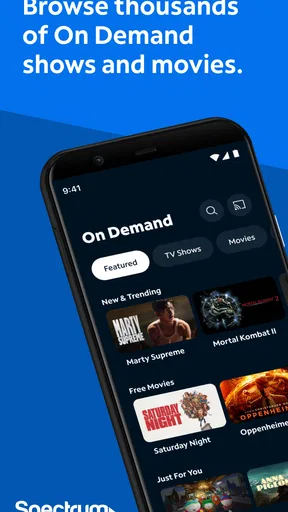
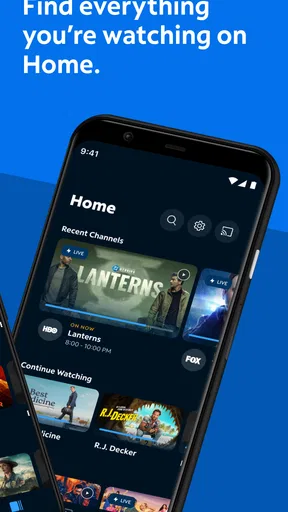
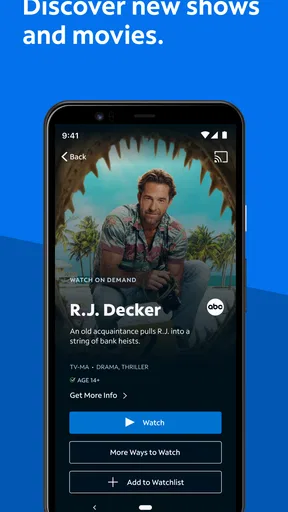
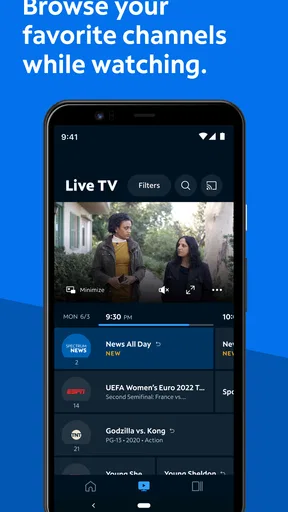

 Analysis by AppCompare
I find Spectrum TV most useful when I think of it as a way to bring a familiar television lineup onto a mobile screen, rather than as a replacement for every streaming service I use. That distinction matters: it is built around watching live channels and on-demand programming, so it suits people who still want the feel of regular TV when they are away from the living-room screen. Spectrum TV is a free entertainment app from Charter/Spectrum, but getting practical value from it depends on having a Spectrum account to sign in with.
That account requirement is the first thing I would check before installing. The app itself does not make a Spectrum subscription unnecessary; it is a companion for people who already have access through Spectrum. If you are choosing a provider from scratch, compare the full service and its channel lineup with alternatives before treating the mobile app as the deciding factor. The useful question is not simply whether the app is free, but whether it fits the TV access you already pay for and the way you actually watch.
Why live and on-demand viewing changes the experience
The core appeal is having live television and on-demand viewing in one place. In practice, that gives me two different ways to use the same app: I can tune in when I want whatever is currently on, or look for a particular program when I have time to choose. It is a useful middle ground between channel surfing and opening a separate streaming service for every specific show.
That combination is especially handy when plans change. If I have a few minutes before leaving, live TV can fill the gap without asking me to pick a whole series. Later, if I have a specific show in mind, on-demand viewing is the more deliberate route. The app’s value is less about a single trick than about keeping those two habits close together.
There is a trade-off, though. A live channel guide can feel familiar to anyone used to cable, but it is not the same as an all-you-can-watch library of streaming originals. And an on-demand selection should not be confused with a guarantee that every show or episode will be available whenever I want it. I would use the app as an extension of Spectrum viewing, not assume it replaces every other source of entertainment.
Getting Started with Spectrum TV
First things first—installing the Spectrum TV app is a breeze. Available on both Android and iOS, you can easily find it in the Google Play Store or the Apple App Store. Once installed, the setup process is pretty straightforward. You’ll need to log in with your Spectrum account, so make sure you have those details handy.
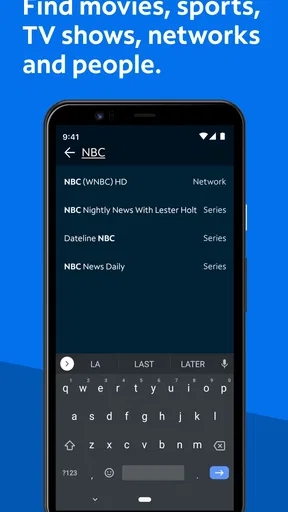
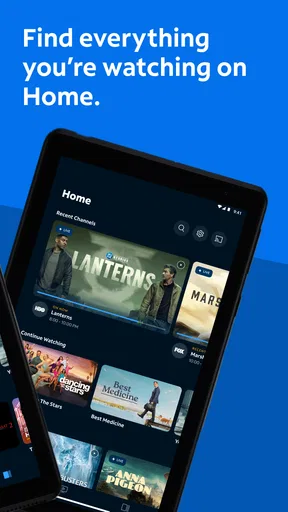
One thing I noticed right off the bat is the clean and intuitive interface. The design is sleek, making it easy to navigate even if you're not tech-savvy. The home screen displays a neat overview of all the available channels, on-demand content, and features. You can tell this app was designed with user experience in mind.
Worth Reading Before You Choose

EA SPORTS FC Mobile 26 Is a Bigger Football Game, but It Takes Time

Flipboard Shows What News Apps Must Do Beyond the Feed

Switching to Android Auto Means Rethinking Your Driving Routine

Google Calendar Makes a Crowded Week Easier to Manage

Ludo King Makes the Most of the Minutes Between Plans

Baby Panda World Brings Quick Play to Modern Phones, but Its Game Library Feels Busy
Exploring the Features
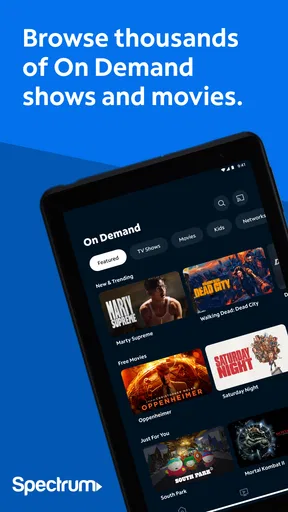
Now, let's talk features! With Spectrum TV, you have access to over 250 live TV channels and thousands of on-demand shows and movies. That’s a lot of content to keep you entertained! The channel lineup is pretty comprehensive, covering everything from news and sports to kids' shows and international programming.
One feature I particularly love is the ability to create a personalized guide. You can customize it to show only the channels you watch regularly, which is a huge time-saver. No more endless scrolling through channels you never tune into!
I would make that guide useful from the start by narrowing it to the channels I genuinely check, rather than trying to preserve the entire lineup. It is a small setup choice, but it changes the app from a broad catalogue into a quicker route to familiar viewing. For a household with different tastes, that also makes it easier to browse without repeatedly passing channels that are irrelevant to the person holding the phone.
The on-demand library is another highlight. Whether you’re catching up on missed episodes or discovering new favorites, the selection is vast. Plus, the search function is quite robust, allowing you to find content by title, actor, or genre. It's like having a mini entertainment hub right in your pocket.
Search is most useful when I already have a lead: a title, performer, or type of program. If I am undecided, browsing a long catalogue can take longer than simply turning on a live channel. I would treat search as a shortcut for a planned watch, and the guide as the better starting point when I want something on in the background. That division keeps the two parts of the app from feeling like competing versions of the same thing.
Performance and Usability
Alright, let’s talk performance. I’ve been using the app on both my smartphone and tablet, and the streaming quality is impressive. Whether on Wi-Fi or data, the streams are smooth with minimal buffering, even during peak hours. This is crucial for those of us who hate interruptions in the middle of a gripping scene!
For a realistic everyday use, I can picture checking a live program while waiting for an appointment, then switching to an on-demand episode later at home. That sort of short-session viewing is where a phone app earns its place: I do not need to plan around the main television just to keep up with something I care about. I would still prefer a larger screen for a long film or a detailed sports broadcast, but a mobile screen is convenient when the alternative is missing the program entirely.
Streaming on mobile also makes the connection part of the decision. I would lean on Wi-Fi when it is available, especially for a longer viewing session, and be more selective when using mobile data. Smooth playback in one situation does not mean every network or location will behave the same way, so I would avoid starting something important right before entering an area where the connection may become unreliable.
Another nice touch is the parental control feature. If you’re concerned about what your kids might stumble upon, you can set restrictions based on ratings. It’s a thoughtful addition that gives parents peace of mind.
For a family, I would set viewing restrictions before handing over the device, rather than waiting until a child has already started browsing. It is also worth remembering that rating-based controls help narrow what appears appropriate; they do not replace an adult’s judgment about what a particular child is ready to watch. That makes the feature helpful as a boundary, not a substitute for household rules.
The app supports multiple devices, which means you can start watching a show on your TV and finish it on your phone or tablet. It's seamless and convenient, perfect for those on-the-go moments.
This handoff is most valuable when the interruption is ordinary: dinner is ready, someone else needs the television, or I have to leave the room. Before relying on it for a specific evening, I would sign in on the device I plan to use and confirm I can reach the program there. That simple check avoids discovering a login problem at the exact moment I want to continue watching.
Where the trade-offs matter
Compared with a standalone subscription streaming service, Spectrum TV is less attractive if what I want is a carefully curated library of one platform’s exclusive series. Compared with watching only on a television, its advantage is portability, not a bigger picture or a more relaxed viewing setup. And compared with free clips or video platforms, it is oriented toward people who want live channels and access tied to their Spectrum account, rather than casual short videos.
The app’s audience is therefore fairly clear. It makes sense for an existing Spectrum customer who wants to keep up with familiar programming around the house or while out, and for a household that values a channel guide alongside on-demand choices. It is a weaker fit for someone without Spectrum access, someone who mainly watches a particular streaming service’s originals, or someone who rarely watches scheduled television and prefers to select every title from a streaming catalogue.
There are a few practical questions I would settle before depending on it. First, check that your Spectrum sign-in works; the app’s usefulness starts and ends with access to the account. Next, see whether the channels you care about appear in the guide available to you rather than assuming every household has the same lineup. If you are planning to watch away from home, test the app in the kind of place and on the kind of connection you expect to use. These checks are more useful than assuming that an app experience will be identical for every viewer.
Spectrum TV has been around since Nov 29, 2011, and its current Android release is 10.2.0.267627118.release, with Android 6.0 as the minimum supported version. It has a 4.7 average from around 357,000 ratings, and over 10 million installs. The app is rated Teen. Those details suggest a well-established service, but popularity alone does not tell me whether its channel access matches a particular account or whether mobile viewing suits someone’s habits.
Final Thoughts
So, what’s the verdict? The Spectrum TV app is a fantastic choice for anyone looking to streamline their viewing experience. With a robust selection of channels, a user-friendly interface, and excellent streaming quality, it truly delivers on its promise.
Sure, there are a few areas that could use some tweaking—like the occasional app crash or login hiccup. But these are minor in the grand scheme of things. Overall, I’d say this app is a win for any TV lover out there.
Whether you're in it for the live sports, the latest blockbuster movies, or your favorite TV shows, Spectrum TV has you covered. So go ahead, give it a whirl and see for yourself. Happy streaming!
My recommendation is to treat it as a convenient extra screen for a Spectrum household, not as a universal answer to every viewing need. If live television is part of your routine and you want the option to pick up a program on a phone or tablet, the mix of a guide and on-demand browsing is genuinely useful. If you do not have Spectrum access, or prefer a library built around a different service, I would choose the option that already matches your subscriptions and viewing habits.
Pros
- User-friendly interface for easy navigation.
- Wide range of live TV channels available.
- On-demand content with flexible options.
- Supports multiple devices and platforms.
- Parental controls for safer viewing.
Cons
- Requires Spectrum subscription to access.
- Limited DVR storage compared to competitors.
- Occasional streaming lags on busy networks.
- Ad interruptions during on-demand viewing.
- Regional restrictions on certain channels.
FAQs for Spectrum TV
What devices are compatible with the Spectrum TV app?
The Spectrum TV app is compatible with a wide range of devices, including smartphones and tablets running Android or iOS. It can also be accessed on Roku, Xbox One, Samsung Smart TVs, and via web browsers on PCs and Macs. Ensure your device meets the minimum OS requirements before downloading.
Do I need a Spectrum cable subscription to use the app?
Yes, a Spectrum cable subscription is required to access live TV and on-demand content through the Spectrum TV app. The app acts as a companion to your cable service, providing access to channels and shows included in your subscription package.
Can I watch live TV on the Spectrum TV app?
Absolutely, the Spectrum TV app allows you to watch live TV on the go. You can stream hundreds of live channels depending on your subscription, giving you the flexibility to watch your favorite shows and sports events anywhere you have an internet connection.
Is there a limit to the number of devices I can use with the app?
While there is no strict limit on the number of devices you can register with your Spectrum account, simultaneous streaming is subject to restrictions. Typically, Spectrum allows streaming on up to three devices at the same time, ensuring a seamless experience across different platforms.
Does the Spectrum TV app support parental controls?
Yes, the Spectrum TV app includes parental control features. You can set restrictions on content based on ratings and block specific channels to ensure a safe viewing environment for children. These settings can be adjusted directly through the app's settings menu.


